Set your weights once. Every grade follows on its own.
One test score drops from 86 to 60 — the weighted average and the letter grade move with it.
An Excel and Google Sheets gradebook for US K-12 teachers. Enter scores as you grade, and it weights every category, carries each term and shows you who is about to slip a grade.
- Tests 40, homework 20, participation 10 — set once, applied to every class and every term.
- See who is one assignment away from dropping a grade, while there is still time to act.
- Print a one-page summary for a parent conference that already adds up.
Works in Excel and Google Sheets. Instant download. Free updates.
Your school weights categories. Most gradebooks don't.
Your school's grade is not a straight average. Tests carry more than homework, homework carries more than participation, and the number that goes on the report card reflects that. Most free gradebook templates average everything equally, so the figure on screen is not the grade you will actually report.
So it gets done by hand. A Sunday afternoon, a calculator, and a column of percentages you re-work every time a late assignment comes in. The district system holds the official record, but it will not tell you what a student needs on Thursday's test to hold a B.
And the students who slip do it quietly. A grade drops by a point and a half across three weeks, and nobody notices until the term closes — when the only honest thing left to say to a parent is that it was already too late to fix.
How it works
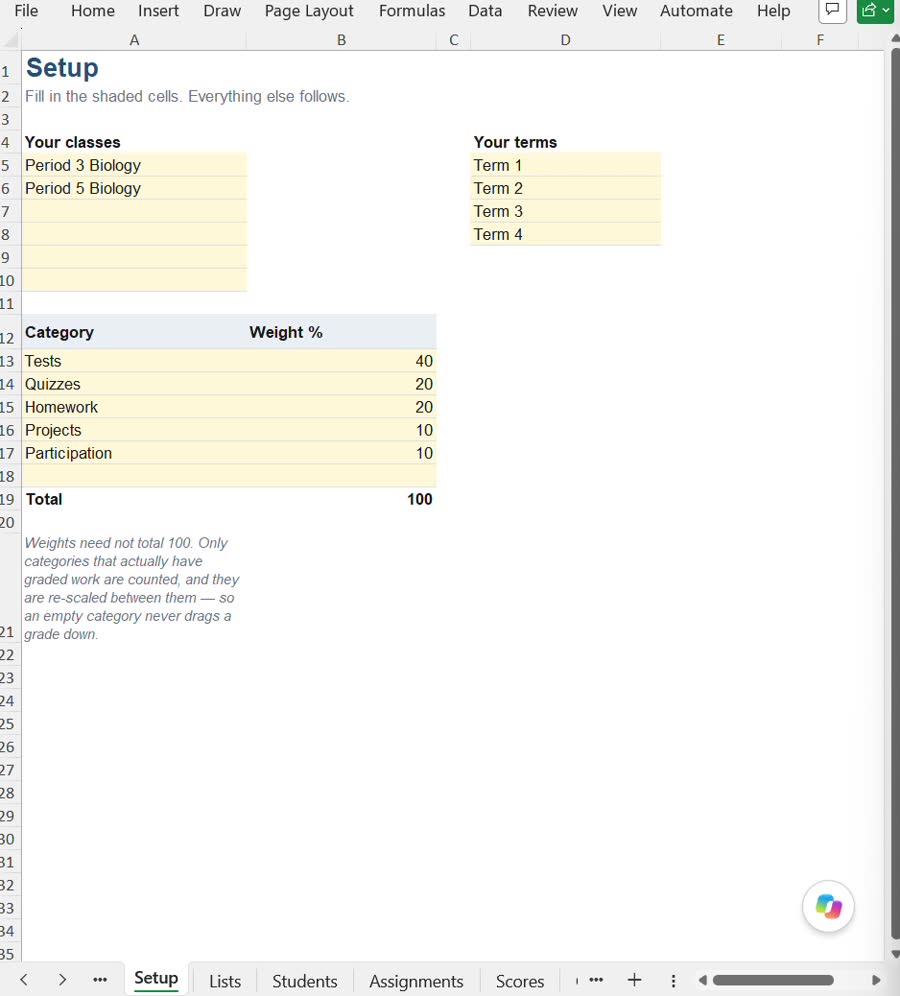
Set your categories and weights
Type your classes, your terms and your weights on the Setup tab — tests 40, homework 20, whatever your school uses. They need not add up to 100, and only categories with graded work are counted, so an empty category never drags a grade down.
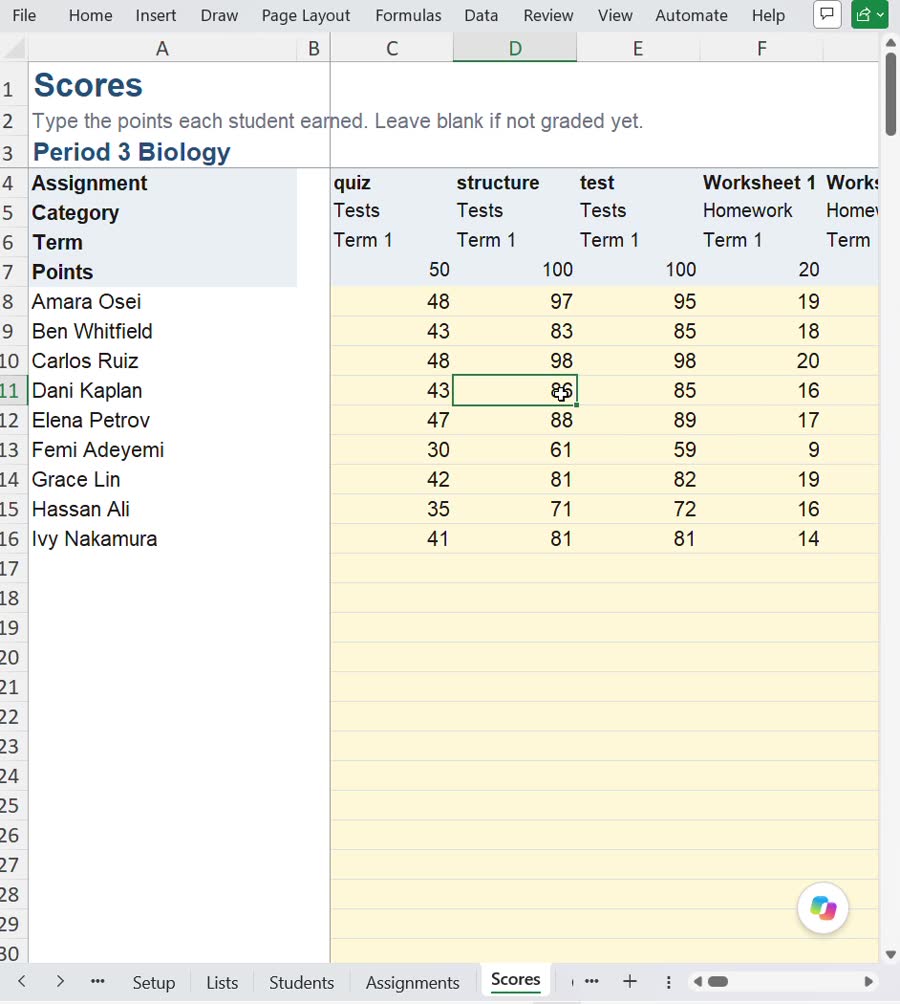
Enter scores as you grade
Students down, assignments across, one score per cell. Up to 6 classes, 40 students a class, 60 assignments a class, across 4 terms. Leave a cell blank until it is graded and nothing breaks.
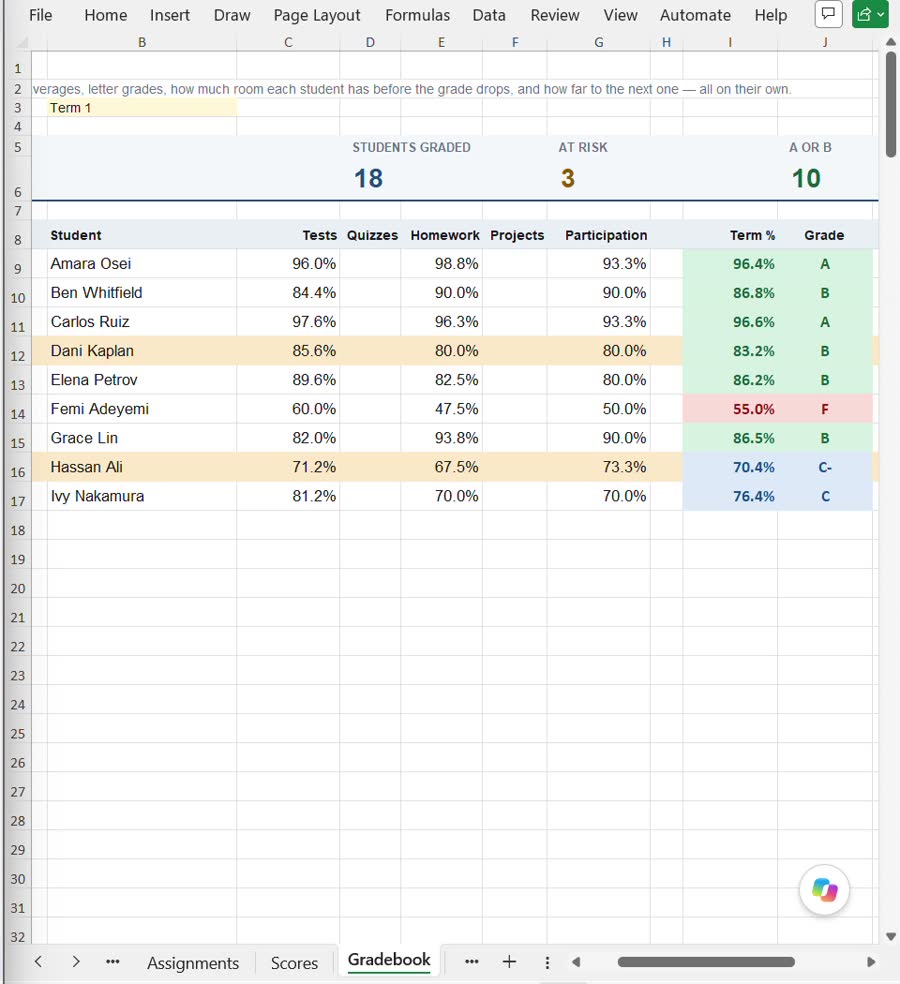
Every average and letter grade follows
Category averages, the weighted term average and the final letter grade recalculate the moment a score lands. The strip along the top counts how many students are graded and how many are about to slip.
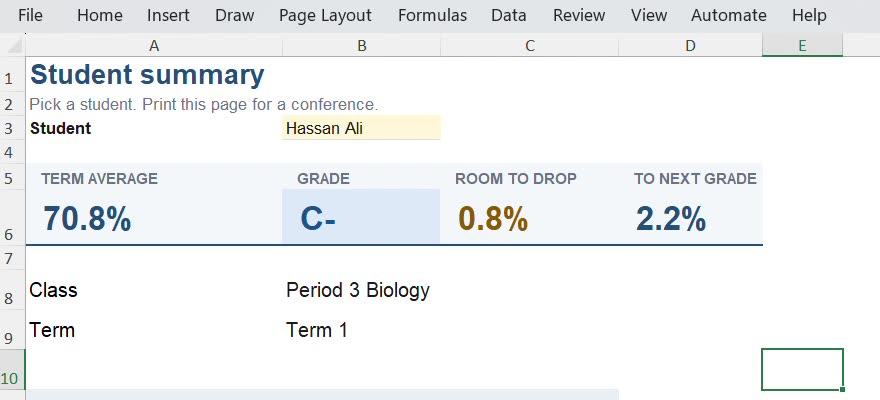
Print the page you hand a parent
Pick a student and the Print pack builds a one-page summary — term average, grade, how much room they have before it drops and how far to the next one — sized to fit Letter or A4, with room for conference notes.
What you get
Excel, Google Sheets — Instant download. Built for US K-12 teachers whose school grades on percentage-weighted categories.
| Start here | Five setup steps, what the shaded cells mean and how to unprotect a sheet if you want to change it |
|---|---|
| Setup | Your classes, your terms, your category weights and the grade boundary table |
| Students | Up to 6 classes of 40 students, with IDs |
| Assignments | Name, class, category, date, points possible and term for every assignment |
| Scores | The grid you actually type in: students down, assignments across |
| Gradebook | Weighted average per category, per term and per student, plus the final letter grade |
| At risk | Every student ranked by how little room they have left before their grade drops, with the distance to the next grade alongside |
| What-if | Pick a student and a target grade, and see what they need on the next assessment — or that it is not reachable on this one |
| Print pack | A conference-ready one-page summary per student, fitting Letter or A4 |
| Lists | The dropdown sources and the at-risk threshold, kept out of your way |
It's for you if
- US K-12 teachers with several classes or preps to keep straight
- Schools and departments that grade on percentage-weighted categories
- Teachers who want to keep the planner they already like and hand off the arithmetic
- A grade team that wants every gradebook in the department built the same way
It's not for you if
- Standards-based grading or 4-point scales — this version is percentage weighting only
- Attendance, seating charts, lesson planning, parent-contact logs or substitute notes — none of those are in here
- Importing from or syncing with a district system — you enter scores yourself
- Grading systems outside the US
Next to the other ways teachers do this
Choose your version
Personal
$49- One teacher, all of your classes
- The Excel file and a Google Sheets copy link
- 6 classes, 40 students a class, 60 assignments a class, 4 terms
- Free updates
Commercial
$69- Everything in Personal
- Use it with paying students — tutoring and private practice
- Free updates
Grade team
$99- Everything in Commercial
- Unlimited teachers in one department
- Set the weighting once and share it, so every gradebook in the department comes out the same
- A receipt you can put through a school budget
14-day refund
Try it for two weeks. If it does not fit the way your school grades, email us with your order number within 14 days and we will refund you in full, no reason needed.
Questions
Does it work in Google Sheets, or only Excel?
Both. You get the Excel file and a Google Sheets copy link, so it works on a school Chromebook, a Mac, a PC, or the Sheets app on an iPad. The formulas are deliberately plain — SUMIFS, SUMPRODUCT, INDEX and MATCH — so both versions behave the same. No macros, nothing to install.
Is this a planner?
No, and it is not trying to be. There is no lesson planning, no seating chart, no attendance. It is the part that does the arithmetic, meant to sit next to the planner you already use.
My school uses standards-based grading. Will this work?
Not in this version. It handles percentage-weighted categories with a letter-grade boundary table you can edit. 4-point and standards-based scales are not supported yet.
Can it pull grades from our district system?
No. There is no import or sync, so you enter scores here yourself. The district system stays the official record; this is where you work out what the grades actually mean.
How much can it hold?
6 classes, 40 students per class, 60 assignments per class, across 4 terms. That is the tested load, not an estimate.
Which licence do I need?
Personal if you are one teacher using it for your own classes. Commercial if you are tutoring or otherwise using it with paying students. Grade team if more than one teacher in your department will use it — that one covers unlimited teachers in a single department.
What happens when it is updated?
Updates to the version you bought are free. You are emailed a new download link; your own data stays in your copy, and the changelog says what moved.
Do my students or parents see any of this?
Only what you choose to print. Everything lives in your own file, on your own machine or your own Google account. Nothing is uploaded anywhere and no account is created.
Is this advice on how to grade?
No. It organises your records and does the arithmetic your settings describe. Grading policy is your school's or district's call, and you should follow their rules.